
Last month, I received a strange text message saying that my bank account was disabled. The text urged me to login to their secure server to verify my information. A link was provided and it was signed ”Support”. Thankfully, I heard of smishing before and I didn’t fall for it. Of course with the holidays being such a busy time, we could all be distracted and make ourselves easy targets for potential “ishing” scams, which can compromise our bank accounts, credit cards, and can potentially lead to debit or credit card fraud and identity theft.
How to Protect Yourself Against Fraud
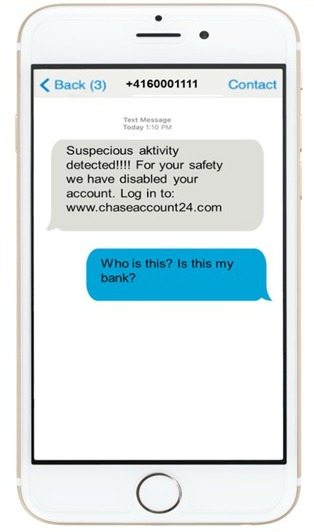
Smishing is when you receive text messages to your cell phone using SMS (Short Message Service) technology in an attempt to trick you into providing your personal information. Minimize your risk: If you stop one second to analyze the text message, you will most likely see spelling and grammatical errors and sometimes notice language that is not typically used by banks. Other red flags would include hyperlinks and overuse of exclamation marks. Look at the image below. Is this a fraudulent smishing text message? Definitely. Overuse of exclamation marks, improper grammar, a request to click on a website link.
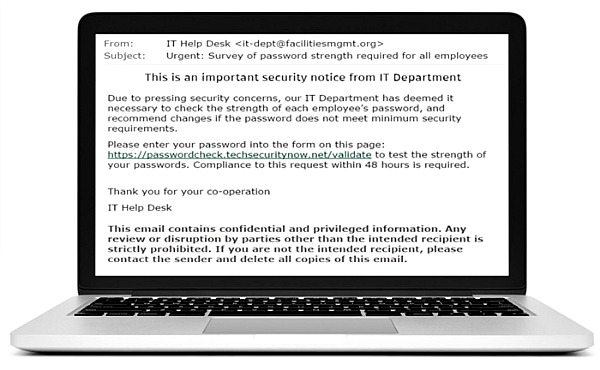
Along with smishing, you might have encountered other types of fraudulent messages including phishing and vishing. Phishing are e-mails that seem to come from legitimate companies in an effort to “fish” or “phish” for personal and financial information. The emails usually ask customers to click on the links provided which will direct you to a fraudulent website asking for your information. Minimize your risk: If you believe that you have received a fraudulent email, do not respond to it and do not click on any links or attachments included. You should not be asked to reply to an email with personal information, login information such as usernames, passwords, PINs, security questions and answers, or account numbers. Look at the image below. Is this a fraudulent email? Yes, it is!
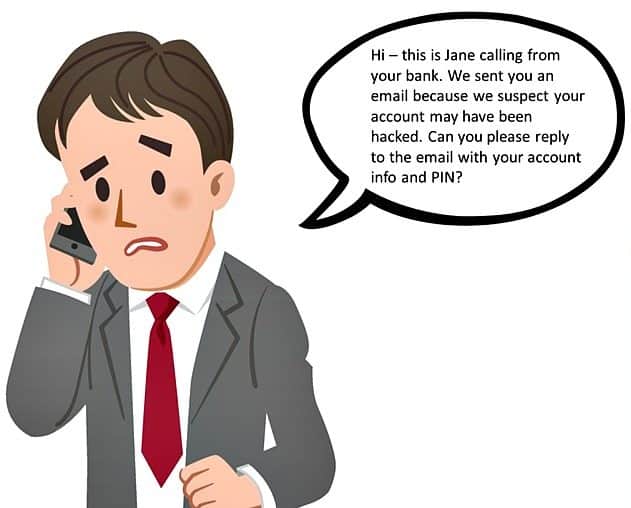
 In the case of vishing, it is telephone communications made to trick you into providing your personal information like credit and debit card number, your SIN, your e-mail address, etc. I must admit that some of the vishing calls that I have received sounded very real until I listen to them a few more times. Minimize your risk: Again, If you suspect the call might not be from a legitimate financial institution, tell them that you will call them back through the toll-free number on the back of the card. Take a look at the image below. Is this a fraudulent call? Definitely.
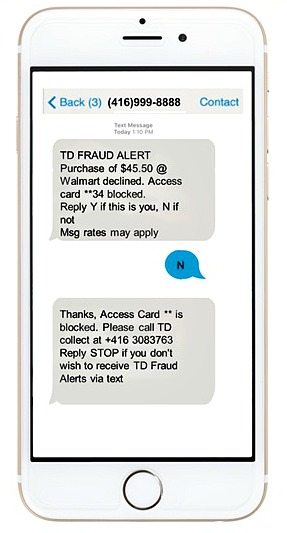
I am very grateful that TD is educating consumers with their tips on how to protect yourself against fraud during this holiday season. TD also wants to help customers avoid falling victim to fraud. TD has a launched new feature that provides free[1] Fraud Alert texts to its Canadian customers. If there is suspicious activity detected on their TD Access Card for their personal banking accounts they will quickly receive a TD Fraud Alert on their mobile phone. These alerts will include information about the transaction and ask you to confirm it. Customers can reply to the alert with a simple “Y” or “N” to confirm whether they recognize the transaction and have TD unblock or block their card. I like the convenience of TD Fraud Alert text messages because your card doesn’t get blocked unnecessarily and you can respond to the alert right from your mobile phone. Just don’t forget to make sure TD has your current mobile number to receive these alerts. More info about TD Fraud Alerts and watch the Video to see how it works: https://www.tdcanadatrust.com/products-services/banking/electronic-banking/access-card/access-card.jsp#tdfraudalerts.
Have a look at the image below. Is it a smishing scam or a legitimate fraud alert? You are right, it is a real TD Fraud Alert. TD will never ask customers to reply to a Fraud Alert text with any personal information or ask customers to click on any links in their reply.
The TD MySpend app can also help keep TD customers aware of all of their purchases and transactions on their TD personal banking and credit card accounts. The real-time notifications when making a purchase on their eligible accounts may enable them to recognize fraudulent purchases right away. To use TD MySpend, the TD app must also be installed on your device.
To win against fraud, it takes both the customer and their bank to work together. Consumers should be aware of the safety measures financial institutions have to protect against fraud. Have you received any smishing texts, phishing emails, and vishing phone calls recently?
[1] TD does not charge any fees for TD Fraud Alerts. However, standard wireless carrier message rates may apply.
- This post has been sponsored by TD Bank. All opinions are my own.
- Minimize your risk: The information above is provided to help you protect yourself, but it’s not foolproof: it’s a fast paced and constantly changing world so make sure you are keeping up-to-date on and monitoring security features and preventative measures to minimize your risk of fraud.












It’s so hard to protect yourself online and I will never understand why there are people out there that want to hurt you. It’s like worrying about criminals that want to physically hurt you.
Thanks for the help TD.
This is such a scary topic that I am becoming more aware of. I use to not think about it much…thinking it couldn’t happen to me but I am taking steps now to protect myself!
I have had fraud stopped with the text alert system. Very grateful for it at that point!
I was a victim of credit card fraud a few months ago. I was so happy that I set up email alerts for transactions over $75 which helped me identify it right away and resolve it with the credit card company that same night!!!! I was so lucky.
TD has always done a great job protecting my accounts
We are with TD so I will have to look into the Fraud Text alert service, first I have heard of it.
IT is scary and sad how many ways they will try to lured into fraud.
There are an awful lot of these scams and not only on the internet but by phone too. Your bank will never ever ask for account info no matter what. The best thing to do is call your bank and hear what they have to say.
Scary stuff!! I had mine hacked last year when I used it online at a large chain store photo lab!! i though I was safe since it was a big company but I was wrong!! Thanks for the tips!!
A long time, I received an email in regards to my PayPal account, saying that I needed to confirm my financial info. I was stupid enough to answer it and was so thankful that nothing came of it. But, I never answer these types of email now. The company/financial org. can call me.
Great tips. It is scary how many ways you can be lured into fraud these days, you have to be very careful.
Although I managed to avoid all these scams so far, I had no idea there are so many “ishing” exist. Thank you for enlightening us! I wish all scams were as easy to recognize as in TD’s examples… sometimes they look very much legitimate even to someone as suspicious as me.
This is awesome that TD is helping and working for their clients, I just switched to TD so I am a new customer and still learning everything that they have to offer!!